

Ergonomic laptop stands solve one problem: getting your screen to eye level so your neck stops paying for your workday. After comparing 15 popular models, the Nulaxy Ergonomic Adjustable Laptop Stand stands out as the best overall pick thanks to its wide height range, sturdy aluminum build, and fold-flat portability. Budget buyers should look at the Amazon Basics Ergonomic Laptop Stand, which delivers height adjustability and cooling ventilation at roughly half the price of premium rivals, while the Lamicall Aluminum Stand is the better choice if you want a fixed-height, rock-solid riser with a cleaner aesthetic. The main tradeoff in this category is stability versus adjustability — the taller and more adjustable a stand, the more wobble you tend to introduce — followed by portability, since the best desktop risers rarely fit in a laptop bag. Read on for the full breakdown, including who each stand suits and who should skip it.

Get the little things that make your day delivered free with Prime
- Fast, free delivery on millions of items
- Prime Video, Amazon Music and more included
- Member-only deals all year
Key Takeaways
- The amazon.com/dp/B077B9W343?tag=theearlierstuff-20&ascsubtag=dc-636966″ target=”_blank” rel=”nofollow sponsored noopener”>Nulaxy dual-foldable stand won best overall because it was the only model balancing a wide height range, genuine desk stability, and fold-flat portability — most rivals compromise on at least one of these.
- Three of the fifteen stands (Tounee, Uncaged, Nulaxy 360°, plus two LOXP models) offer a 360° rotating base, but only the Uncaged kept the swivel mechanism from introducing wobble — rotation is the biggest stability tax in this lineup.
- The Lifelong Extra Tall 20-inch riser is the only option that reaches true standing-desk or very-tall-user heights; everything else tops out around 8-12 inches, which is fine for seated work only.
- Acrylic and fixed-height stands like the JCZT and Lamicall trade adjustability for looks and rigidity — they’re great as permanent desk fixtures but wrong for anyone sharing a workspace or working from multiple locations.
- Budget stands under $25 (Amazon Basics, generic metal risers) are genuinely usable now, but they consistently cut corners on height increments and hinge quality, which limits how precisely you can dial in your screen angle.
| Nulaxy Ergonomic Adjustable Laptop Stand for Desk |  | Best Overall | Material: Metal | Compatibility: 10-16 inch laptops | Maximum Load: 22 lbs (10kg) | VIEW LATEST PRICE | See Our Full Breakdown |
| Laptop Stand for Desk (360° Rotating), Aluminum Laptop Riser | 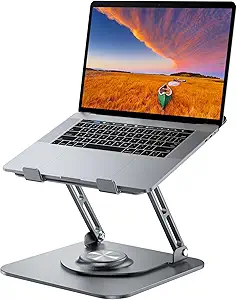 | Best for Shared Workspaces | Material: Aluminum alloy | Compatibility: 10-16 inch laptops and tablets | Maximum Load: 11 lbs | VIEW LATEST PRICE | See Our Full Breakdown |
| Besign LS03 Aluminum Laptop Stand |  | Best Budget Pick | Material: Aluminum alloy | Compatibility: 10-15.6 inch laptops | Maximum Load: 8.8 lbs (4 kg) | VIEW LATEST PRICE | See Our Full Breakdown |
| Lamicall Aluminum Laptop Stand for Desk |  | Best for Large Laptops | Material: Aluminum alloy | Compatibility: 10-17.3 inch laptops | Dimensions: 12 x 10 x 2 inches | VIEW LATEST PRICE | See Our Full Breakdown |
| JCZT Clear Acrylic Laptop Stand with Wrist Rest |  | Best for Wrist Comfort and Style | Material: Clear acrylic | Height: 2.7 inches (fixed) | Support Size: Laptops up to 17 inches | VIEW LATEST PRICE | See Our Full Breakdown |
| LOXP Adjustable Laptop Stand for Desk, Portable Airflow Laptop Riser Holder |  | Best Budget Travel Pick | Material: Metal | Weight: 0.88 kg | Max Laptop Size: 15.6 inches | VIEW LATEST PRICE | See Our Full Breakdown |
| Tounee Telescopic Laptop Stand with 360° Swivel Base, Height Adjustable, Portable Riser for All Laptops 10-17″ – Gray |  | Best for Sit-Stand Work | Height Range: 2.1″ to 21″ | Rotation: 360° | Support Weight: Up to 22 lbs | VIEW LATEST PRICE | See Our Full Breakdown |
| Nulaxy 360° Rotating Ergonomic Laptop Stand for Desk, Dual Foldable Design |  | Best for Heavy Laptops | Rotation: 360° | Load Capacity: 22 lbs | Dimensions: 9.7 x 9.5 x 2.7 inches | VIEW LATEST PRICE | See Our Full Breakdown |
| Adjustable Laptop Stand for Desk, Metal Laptop Riser Holder |  | Best Value Pick | Material: Metal | Weight: 780 g | Maximum Load: 17.6 lbs (8 kg) | VIEW LATEST PRICE | See Our Full Breakdown |
| Uncaged Ergonomics Swivel Laptop Stand for Desk, 360 Riser, Arctic Silver |  | Best Premium Compact Pick | Color: Arctic Silver | Material: Metal | Dimensions: 10.2 x 10 inches | VIEW LATEST PRICE | See Our Full Breakdown |
| LOXP Laptop Stand for Desk, Aluminum Laptop Riser Holder with Wrist Support |  | Best for Typing Comfort | Material: Anodized aluminum alloy | Lift Height: 2.6 inches (fixed) | Compatibility: Laptops 9.3–17.3 inches | VIEW LATEST PRICE | See Our Full Breakdown |
| Amazon Basics Sturdy and Portable Ergonomic Laptop Stand for Desk |  | Best Value | Material: Lightweight rust-resistant aluminum | Height Adjustment: Up to 7 inches | Supported Devices: Laptops and tablets 10–15.6 inches | VIEW LATEST PRICE | See Our Full Breakdown |
| LOXP Adjustable Laptop Stand with 360° Rotating Base |  | Best for Collaboration | Material: Fiber metal | Supported Laptop Size: 10–16 inches | Rotation: 360° swivel base | VIEW LATEST PRICE | See Our Full Breakdown |
| Laptop Stand for Desk, Adjustable and Foldable Metal Riser Holder |  | Best for Heavy Laptops | Load Capacity: 17.6 lbs (8 kg) | Material: ABS, aluminum, silicone | Adjustable: Yes — height and angle | VIEW LATEST PRICE | See Our Full Breakdown |
| Lifelong Aluminum Adjustable Laptop Stand, Extra Tall 20″ Riser |  | Best for Tall Users and Standing Desks | Material: Aluminum | Maximum Height: 20 inches | Arm Extension: 13 inches | VIEW LATEST PRICE | See Our Full Breakdown |
| ergonomic laptop stand | Material | Compatibility | Weight |
|---|---|---|---|
| Nulaxy Ergonomic Adjustable La | Metal | 10-16 inch laptops | 1.7 pounds |
| Laptop Stand for Desk | Aluminum alloy | 10-16 inch laptops and tablets | — |
| Besign LS03 Aluminum Laptop St | Aluminum alloy | 10-15.6 inch laptops | — |
| Lamicall Aluminum Laptop Stand | Aluminum alloy | 10-17.3 inch laptops | 0.06 kg (listed) |
| JCZT Clear Acrylic Laptop Stan | Clear acrylic | — | — |
| LOXP Adjustable Laptop Stand f | Metal | — | 0.88 kg |
| Tounee Telescopic Laptop Stand | Aluminum alloy | Laptops 10-17 inches | — |
| Nulaxy 360° Rotating Ergonomic | — | — | 840 g |
| Adjustable Laptop Stand for De | Metal | Laptops 10-15.6 inches, tablets, books | 780 g |
| Uncaged Ergonomics Swivel Lapt | Metal | 10 to 15.6-inch devices | — |
| LOXP Laptop Stand for Desk | Anodized aluminum alloy | Laptops 9.3–17.3 inches | 0.49 kg (about 1.1 lbs) |
| Amazon Basics Sturdy and Porta | Lightweight rust-resistant aluminum | — | 1.7 lbs (0.77 kg) |
| LOXP Adjustable Laptop Stand w | Fiber metal | — | 1.53 kg |
| Laptop Stand for Desk | ABS, aluminum, silicone | Laptops 10–15.6 inches | — |
| Lifelong Aluminum Adjustable L | Aluminum | Laptops and tablets 10–17 inches | — |
More Details on Our Top Picks
Nulaxy Ergonomic Adjustable Laptop Stand for Desk
Among all the stands in this roundup, the Nulaxy dual-foldable riser hits the widest balance of adjustability, stability, and price, which is why it earns the top slot. Its dual-rod support system keeps a 16-inch laptop steady even during animated typing — something lighter single-column designs like the Besign LS03 struggle with at full extension. The advanced heat vents matter more than they sound: an elevated, ventilated tray keeps throttling at bay during long work sessions. Compared with the Lamicall below, it gives up some size range (10–16 inches versus 10–17.3) but gains a more confidence-inspiring 22 lb load rating. The tradeoff: the height adjustment range won’t lift a screen to true eye level for taller users, and it can wobble on uneven desks.
Pros:- Dual-rod support keeps laptops wobble-free during typing
- Heat vents actively reduce thermal throttling
- Folds flat for commuting and travel
- 22 lb load rating handles heavier gaming or workstation laptops
Cons:- Height range falls short of full eye-level elevation for tall users
- Stability suffers on uneven or soft surfaces
Best for: Remote workers who want a stable, adjustable, everyday riser that travels well between home and office
Not ideal for: Taller users needing near-monitor screen height — the adjustment range tops out below true eye level
- Material:Metal
- Compatibility:10-16 inch laptops
- Maximum Load:22 lbs (10kg)
- Weight:1.7 pounds
- Dimensions:11.81 x 11.02 x 2.76 inches
- Features:Adjustable, foldable, heat-vent, portable
Our verdict“The safest all-around pick for most desk setups unless you need extreme height or a 17-inch-plus machine.”
Laptop Stand for Desk (360° Rotating), Aluminum Laptop Riser
What separates this riser from the pack is its 360° rotating base, a feature only the Tounee telescopic and Uncaged swivel stands in this lineup can match. If your workflow involves spinning a screen toward a colleague, client, or a second seat at the kitchen table, this matters far more than raw elevation. The aluminum alloy build with a weighted base feels more planted than the Nulaxy above, though its 11 lb load cap means heavier workstation laptops should stay on the Nulaxy instead. Height reaches a respectable 11.8 inches — taller than the fixed Besign LS03 — and it folds down to a slim 1.25-inch profile. The catch: the swivel mechanism occasionally needs tightening to stay rock-solid, and the weight limit rules out gaming rigs.
Pros:- 360° swivel makes screen-sharing effortless
- Weighted aluminum base resists tipping
- Folds to just 1.25 inches thick for travel
- Aluminum construction aids heat dissipation
Cons:- 11 lb maximum load excludes heavier laptops
- Swivel joint may need periodic retightening for stability
Best for: Hybrid workers and consultants who frequently share their screen across a table or desk
Not ideal for: Owners of heavy 17-inch gaming or workstation laptops — the 11 lb limit is too tight
- Material:Aluminum alloy
- Compatibility:10-16 inch laptops and tablets
- Maximum Load:11 lbs
- Max Height:11.81 inches
- Rotation:360°
- Folded Dimensions:9.45 x 9.45 x 1.25 inches
Our verdict“Buy this if collaboration is part of your daily routine; skip it if you run a heavy machine.”
Besign LS03 Aluminum Laptop Stand
At its price point, the Besign LS03 delivers the core ergonomic benefit — raising a screen roughly 5.7 inches to take the bend out of your neck — without the cost of motorized-positioning features you may never touch. Compared with the Nulaxy above, you give up the adjustable-height range entirely: this is a fixed-elevation stand, set it and forget it. That fixed design is also its virtue — no hinges to loosen, no wobble at the joints, and the detachable aluminum build stores flat in a drawer. The 8.8 lb load limit is the real constraint; a 16-inch MacBook Pro is fine, but chunkier machines should step up to the Nulaxy’s 22 lb rating. Ventilation is solid thanks to the open aluminum frame.
Pros:- Very low price for a genuine ergonomic lift
- Fixed design means no hinge wobble over time
- Detachable construction stores flat and assembles quickly
- Open aluminum frame keeps laptops cool
Cons:- No height or angle adjustment at all
- 8.8 lb load cap excludes heavier laptops
Best for: Students and budget-conscious buyers with standard ultrabooks who want a set-and-forget desk riser
Not ideal for: Anyone with a heavy laptop or a need for adjustable height — neither is supported here
- Material:Aluminum alloy
- Compatibility:10-15.6 inch laptops
- Maximum Load:8.8 lbs (4 kg)
- Elevation Height:Up to 14.5 cm / 5.7 inches
- Color:Silver
- Design:Fixed height, detachable
Our verdict“The cheapest credible posture fix in this lineup, provided your laptop is light and your expectations are simple.”
Lamicall Aluminum Laptop Stand for Desk
Most stands in this roundup stop at 16 inches, which quietly excludes the growing crowd of 17.3-inch desktop-replacement laptops. The Lamicall riser covers 10 to 17.3 inches, and its large stable base is sized accordingly — a big laptop sits firmly instead of teetering the way it can on the Besign LS03’s narrower tray. Adjustability covers both height and angle, putting it ahead of the fixed Besign while remaining foldable for transport, though at this footprint it’s more of an occasional-travel stand than a daily commuter like the slimmer Nulaxy. The genuine frustration is transparency: Lamicall doesn’t publish a clear maximum weight capacity, which matters if you own one of the very heavy machines this stand exists to support. You’re trusting the design rather than a spec sheet.
Pros:- Fits laptops up to 17.3 inches, wider than most rivals here
- Large base prevents shaking on bigger machines
- Height and angle are both adjustable
- Folds down for storage or occasional transport
Cons:- No published maximum weight capacity
- Bulkier than slim stands like the Nulaxy when packed
Best for: Owners of 17-inch desktop-replacement or gaming laptops who struggle to find a compatible riser
Not ideal for: Frequent travelers — the large footprint makes it clumsier to pack than compact rivals
- Material:Aluminum alloy
- Compatibility:10-17.3 inch laptops
- Dimensions:12 x 10 x 2 inches
- Mounting Type:Tabletop
- Features:Adjustable, ergonomic, foldable, portable
- Weight:0.06 kg (listed)
Our verdict“The go-to choice if your laptop is too big for everything else on this list — just verify your machine’s weight yourself.”
JCZT Clear Acrylic Laptop Stand with Wrist Rest
Every other stand here angles your screen but leaves your wrists hanging off the laptop’s edge — the JCZT’s integrated wrist rest is the differentiator, cushioning the heel of your hands during long typing sessions. It’s the pick for people whose pain shows up in their wrists before their neck. The clear acrylic design also disappears visually on a desk, a look the industrial silver of the Besign LS03 or Nulaxy can’t match if your workspace leans minimalist. The tradeoff is rigidity: at a fixed 2.7-inch height with no adjustment, it’s the least flexible stand in this batch. It accepts laptops up to 17 inches, which beats the Nulaxy, and assembly needs no tools — but anyone who wants to tune their screen height week to week should buy the Lamicall instead.
Pros:- Built-in wrist rest directly addresses typing strain
- Clear acrylic suits minimalist and modern desks
- Anti-slip rubber pads protect the laptop and desk
- Tool-free assembly in minutes, supports up to 17-inch laptops
Cons:- Zero height or angle adjustability
- Acrylic is more prone to visible scratches than aluminum over time
Best for: Writers and typists with wrist strain who value a clean, minimalist desk aesthetic
Not ideal for: Anyone who wants adjustable height — the 2.7-inch elevation is completely fixed
- Material:Clear acrylic
- Height:2.7 inches (fixed)
- Support Size:Laptops up to 17 inches
- Assembly:No tools required
- Special Feature:Integrated wrist rest
- Grip:Anti-slip rubber pads
Our verdict“Choose this for wrist-first ergonomics and looks; choose an adjustable rival if screen height flexibility matters more.”
LOXP Adjustable Laptop Stand for Desk, Portable Airflow Laptop Riser Holder
For shoppers who want basic ergonomic lift without paying a premium, this LOXP stand covers the essentials: adjustable height and angle, foldable design, and ventilated metal construction that keeps a warm laptop from throttling. Compared with the Amazon Basics adjustable riser, it trades away brand polish but keeps the same 10-to-15.6-inch compatibility range at a lower price, which matters if this is a secondary stand for travel rather than a daily desk anchor. The open airflow design does real work for cooling, unlike solid-deck stands such as the JCZT acrylic model, which looks sleeker but traps heat. The tradeoff is ceiling: unlike the Tounee telescopic stand, it can’t reach anywhere near standing height, so it’s strictly a seated-posture fix. Stability on uneven surfaces is also mediocre — fine on a desk, less so on a café table with a wobbly leg.
Pros:- Foldable and light enough for daily commuting at 0.88 kg
- Ventilated metal deck genuinely helps with heat dissipation
- Holds up to 15.4 lbs, enough for most mainstream laptops
- Non-slip pads keep the laptop planted during typing
Cons:- Caps out at 15.6-inch laptops, excluding larger workstations
- Feels less stable on uneven or soft surfaces
Best for: Students and commuters who need a cheap, foldable stand that fits in a backpack and improves seated posture
Not ideal for: Owners of 16-inch or 17-inch laptops, and anyone wanting a standing-desk-height riser — this stops well short of that
- Material:Metal
- Weight:0.88 kg
- Max Laptop Size:15.6 inches
- Maximum Load:15.4 lbs (7 kg)
- Adjustable Height:Yes
- Foldable:Yes
- Cooling:Enhanced ventilation
Our verdict“A sensible low-cost pick for seated work and travel, as long as your laptop is 15.6 inches or smaller.”
Tounee Telescopic Laptop Stand with 360° Swivel Base, Height Adjustable, Portable Riser for All Laptops 10-17″ – Gray
The standout feature here is range: this stand telescopes from 2.1 to 21 inches, which puts it in rare territory alongside the Lifelong Extra Tall 20-inch riser and far above seated-only options like the LOXP. That range is the whole point — if you alternate between sitting and standing at your desk, this is one of the few portable options that does both without a monitor arm. The 360° swivel base also makes screen-sharing during meetings easier than fixed stands such as the Besign LS03. The tradeoffs are spatial and financial: a full-height pole needs desk real estate and clearance to rotate, so compact workstations will feel cramped, and telescoping designs cost more than simple folding risers. At 22 lbs of support it handles 17-inch laptops that smaller stands reject outright.
Pros:- Telescopes up to 21 inches for genuine standing-height use
- 360° rotation simplifies collaboration and screen sharing
- Supports laptops up to 17 inches and 22 lbs
- Folds down compactly despite the tall range
Cons:- Footprint and rotation clearance demand a generous desk
- Telescoping designs typically cost more than basic folding risers
Best for: Home-office workers who alternate between sitting and standing and want one stand for both positions
Not ideal for: People with small desks or shared coworking tables — the footprint and rotation clearance are demanding
- Height Range:2.1″ to 21″
- Rotation:360°
- Support Weight:Up to 22 lbs
- Compatibility:Laptops 10-17 inches
- Material:Aluminum alloy
Our verdict“The pick for sit-stand workflows, provided your desk has the space to let it stretch and rotate.”
Nulaxy 360° Rotating Ergonomic Laptop Stand for Desk, Dual Foldable Design
If you’re propping up a 16-inch MacBook Pro or a chunky workstation, load capacity stops being a footnote and becomes the deciding spec. This Nulaxy handles 22 lbs without wobble, matching the Tounee’s capacity while skipping the tall telescoping pole — a better fit if you want a stable, desk-bound riser rather than a sit-stand solution. The 360° rotating base is genuinely useful for turning your screen toward a colleague or a second seating position, something fixed risers like the Besign LS03 simply can’t do. The dual-foldable design also packs down smaller than the Tounee, so it travels better despite the sturdy build. Two things hold it back: the manufacturer doesn’t specify the material, which makes durability claims hard to verify, and there’s no dedicated cooling architecture — a consideration for thermally demanding machines, where the ventilated LOXP does more.
Pros:- 22 lb load capacity with a stable, wobble-free platform
- 360° rotation makes screen sharing and pairing easy
- Dual-foldable design is more travel-friendly than most high-capacity stands
- Silicone pads protect the laptop’s finish and prevent sliding
Cons:- Material is unspecified, making long-term durability hard to judge
- No ventilation features for thermally stressed machines
Best for: Owners of heavy 14-16 inch laptops who want a rock-solid desk riser with screen-sharing flexibility
Not ideal for: Anyone with a 17-inch laptop — the 16-inch compatibility cap excludes the largest machines the Tounee accepts
- Rotation:360°
- Load Capacity:22 lbs
- Dimensions:9.7 x 9.5 x 2.7 inches
- Weight:840 g
- Color:Black
- Compatible Devices:Laptops 10-16 inches
Our verdict“The strongest choice for weighty laptops that need a steady, swiveling desk perch rather than extra height.”
Adjustable Laptop Stand for Desk, Metal Laptop Riser Holder
This unbranded metal riser wins on price-to-capacity ratio: at 17.6 lbs of support and 780 g, it out-lifts the similarly sized LOXP portable stand while weighing less, and it doubles as a stand for tablets and books — a small but real perk for recipe-reading or sheet-music use that most laptop-only stands can’t match. The ventilation holes provide the same heat relief as the LOXP’s airflow design, and the anti-skid pads keep things steady during typing bursts. Where it falls short of pricier options like the Lamicall aluminum stand is refinement: the folding hinges feel more utilitarian, the rubber pads will likely wear before the metal does, and the 15.6-inch size cap means larger laptops overhang awkwardly. As a first ergonomic upgrade for a home desk or a spare for the kitchen table, though, it’s hard to argue with the price.
Pros:- 17.6 lb capacity at a lighter weight than comparable budget stands
- Ventilation holes keep laptops running cooler
- Works with tablets and books, not just laptops
- Folds flat for storage or travel
Cons:- Rubber pads are prone to wearing down over time
- Larger laptops can overhang the small deck
Best for: Budget-conscious buyers wanting a first ergonomic stand, or a versatile riser that also holds tablets and books
Not ideal for: Owners of 16-inch-plus laptops, and anyone who wants a polished, premium desk aesthetic
- Material:Metal
- Weight:780 g
- Maximum Load:17.6 lbs (8 kg)
- Compatibility:Laptops 10-15.6 inches, tablets, books
- Foldable:Yes
- Adjustable:Yes
- Cooling:Ventilation holes
Our verdict“The best bang-for-buck entry point into laptop ergonomics, ideal for smaller machines and mixed uses.”
Uncaged Ergonomics Swivel Laptop Stand for Desk, 360 Riser, Arctic Silver
Uncaged Ergonomics brings a designer sensibility that generic risers lack — the Arctic Silver finish looks intentional on a styled desk in a way that basic black folding stands don’t. Functionally, it combines the 360° swivel of the Nulaxy rotating stand with a vented deck for cooling, which the Nulaxy lacks, and folds flat for transport like the rest of the lineup. The one-year warranty also signals more confidence than no-name alternatives, which typically offer none. The compromises are capacity and size: it tops out at 15.6-inch devices and isn’t rated for the heaviest workstations the way the Nulaxy or Tounee are, so a 16-inch MacBook Pro is off the menu. The aesthetic-forward design may also clash with warmer, wood-heavy desk setups. You’re paying a premium partly for looks — worth it if your workspace is on display, less so if it lives under a loft bed.
Pros:- Vented deck actively cools during long sessions
- 360° swivel plus adjustable height and tilt in one unit
- Folds flat for travel between home and office
- Backed by a one-year warranty
Cons:- Limited to 15.6-inch devices
- Not ideal for very heavy laptops
- Premium styling comes at a premium price
Best for: Design-conscious remote workers with 13-15 inch laptops who want an attractive, warranty-backed riser
Not ideal for: Heavy 16-inch-plus laptop owners and buyers prioritizing maximum capacity per dollar
- Color:Arctic Silver
- Material:Metal
- Dimensions:10.2 x 10 inches
- Compatibility:10 to 15.6-inch devices
- Rotation:360°
- Cooling:Vented channels
- Warranty:1 year
Our verdict“The best pick if you want ergonomics that look as considered as your desk setup, with smaller laptops in mind.”
LOXP Laptop Stand for Desk, Aluminum Laptop Riser Holder with Wrist Support
Most stands in this roundup lift your laptop and leave your wrists hanging — the LOXP wrist support riser is the rare model that addresses both halves of the posture equation. Its built-in palm rest keeps your wrists neutral while the 2.6-inch lift raises the screen, which matters for anyone who types for hours and feels strain that a riser alone doesn’t fix. Compared with the Besign LS03, which offers a similar fixed-height aluminum frame, the LOXP trades a little height for that wrist cradle and an open-frame design the brand claims exposes up to 90% of the chassis to airflow. The triangle-braced, screw-free assembly detaches quickly, so it works as a travel stand in a pinch. The tradeoff is real, though: 2.6 inches is a modest raise, and you can’t adjust it. If your goal is eye-level screening, the Lifelong extra-tall stand does that far better.
Pros:- Built-in wrist support reduces typing strain, a feature almost no competitor includes
- Open-frame aluminum design maximizes airflow for cooling
- Tool-free assembly and detachable design make it genuinely portable
- Fits a very wide range of laptops from 10 to 17.3 inches
Cons:- Fixed, low height of 2.6 inches limits real ergonomic correction
- No angle or height adjustment unlike the Amazon Basics or Lifelong stands
Best for: Writers, coders, and all-day typists who want wrist relief alongside a modest screen lift
Not ideal for: Anyone needing serious height — 2.6 inches won’t bring a laptop screen close to eye level on a standard desk
- Material:Anodized aluminum alloy
- Lift Height:2.6 inches (fixed)
- Compatibility:Laptops 9.3–17.3 inches
- Weight:0.49 kg (about 1.1 lbs)
- Setup:Detachable, no screws required
- Warranty:3 years
- Color:Black
Our verdict“Buy this if wrist fatigue is your main complaint; skip it if you need to raise your screen toward eye level.”
Amazon Basics Sturdy and Portable Ergonomic Laptop Stand for Desk
This is the no-drama pick of the roundup: up to 7 inches of height adjustment, aluminum build, folding frame, and a price that undercuts the Nulaxy and Lamicall stands it competes with. Where the LOXP wrist-support model locks you at one low height, the Amazon Basics riser lets you actually dial in your screen position — which is the entire point of an ergonomic stand. The ventilated platform keeps thermals in check, and at 1.7 pounds folding to under 2 inches thick, it slides into a bag more easily than most fixed frames like the Besign LS03. It isn’t flawless. The 15.6-inch size cap is tighter than the Lifelong’s 17-inch range, and toppling risk rises with heavier 16-inch gaming laptops at full extension. It also demands a flat, solid surface — on a wobbly café table it feels noticeably less planted than the heavier LOXP rotating stand.
Pros:- Up to 7 inches of height adjustment at a budget price
- Folds flat to 1.8 inches thick for genuine travel portability
- Ventilated aluminum platform aids cooling
- 11 lb load capacity covers most mainstream laptops
Cons:- Capped at 15.6-inch laptops, smaller than several rivals here
- Stability decreases with heavier machines at maximum height
- Requires a flat, solid surface for dependable footing
Best for: Budget-conscious students and hybrid workers who want real adjustability without paying premium prices
Not ideal for: Owners of 16-inch-plus gaming or workstation laptops — the size cap and stability at full height are limiting
- Material:Lightweight rust-resistant aluminum
- Height Adjustment:Up to 7 inches
- Supported Devices:Laptops and tablets 10–15.6 inches
- Load Capacity:11 lbs (5 kg)
- Folded Size:10 x 8.7 x 1.8 inches
- Weight:1.7 lbs (0.77 kg)
- Color:Silver
Our verdict“The safest spending decision in the lineup — adjustable, portable, and cheap enough that its limits are forgivable.”
LOXP Adjustable Laptop Stand with 360° Rotating Base
When your workday involves turning your screen toward clients, teammates, or a second desk, a static riser forces awkward lifting and repositioning. The 360° rotating base on this LOXP solves that — spin the laptop rather than move it — which is the same trick the Tounee telescopic and Nulaxy rotating stands pull off, but at a friendlier weight class for carrying between rooms. Unlike its sibling LOXP wrist-support model, this one offers genuine height and angle adjustment, so it can actually chase eye level rather than just tilt. The fiber-metal frame handles up to 16-inch laptops and folds for travel. Real tradeoffs exist: at 1.53 kg it’s one of the heavier portable options here — the Amazon Basics stand is nearly half the weight — and the rotating base can introduce a faint wobble when you type on taller settings. On uneven outdoor surfaces, it’s less sure-footed than simpler fixed designs.
Pros:- 360° rotation makes screen sharing effortless without lifting the laptop
- Adjustable height and angle for true ergonomic positioning
- Folds flat despite the rotating mechanism
- Accommodates laptops up to 16 inches
Cons:- Heavier than most portable rivals at 1.53 kg
- Rotation base can add slight wobble at higher settings
- Only available in black
Best for: Office and studio users who share their screen in meetings, design reviews, or multi-person workstations
Not ideal for: Minimalist travelers — at 1.53 kg it’s heavier than folding alternatives built purely for portability
- Material:Fiber metal
- Supported Laptop Size:10–16 inches
- Rotation:360° swivel base
- Dimensions:12.21 x 12.61 x 2.76 inches
- Weight:1.53 kg
- Mounting Type:Tabletop
- Color:Classic Black
Our verdict“The right pick if your workflow revolves around showing your screen to other people; overkill if you work solo.”
Laptop Stand for Desk, Adjustable and Foldable Metal Riser Holder
Most stands in this roundup top out at 11 pounds of load capacity — enough for a MacBook Air, marginal for a 17-inch gaming brick with cooling fans humming. This riser’s 17.6 lb rating is the standout number, and it’s why it earns a slot despite being one of the plainer designs here. The multi-hole ventilation matters more on heavy machines too, since big laptops dump the most heat. Compared with the Amazon Basics stand, which shares the adjustable-and-foldable formula, this model trades the 7-inch max height for sheer carrying capacity and a sturdier planted feel under weight. The silicone-padded contact points protect the chassis from scratches — a nice touch the bare aluminum rivals skip. The compromises: it’s capped at 15.6-inch machines despite the weight headroom, which is an odd pairing, and folding portability is adequate rather than class-leading. If you want height range instead of muscle, look elsewhere in this lineup.
Pros:- 17.6 lb load rating outlifts nearly every stand in this roundup
- Anti-slip silicone pads protect the laptop and the desk
- Multiple ventilation holes for effective heat dissipation
- Folds down for reasonable portability
Cons:- Compatibility stops at 15.6 inches despite the heavy load rating
- Lower maximum height than the Amazon Basics or Lifelong stands
Best for: Owners of heavy 15-inch gaming or workstation laptops who found lighter stands wobble under load
Not ideal for: Users of 16–17 inch laptops — the weight capacity is there, but the platform size cap isn’t
- Load Capacity:17.6 lbs (8 kg)
- Material:ABS, aluminum, silicone
- Adjustable:Yes — height and angle
- Foldable:Yes
- Ventilation:Multiple ventilation holes
- Compatibility:Laptops 10–15.6 inches
Our verdict“The muscle pick — choose it when your laptop’s weight rules out everything else here.”
Lifelong Aluminum Adjustable Laptop Stand, Extra Tall 20″ Riser
Every other stand here maxes out between 2.6 and 7 inches of lift — fine for average desks, useless if you’re tall, using a standing desk, or trying to pair the laptop with an external keyboard at true eye level. The Lifelong riser extends to a full 20 inches with 13-inch arm extension, putting it in a different category entirely, closer to a portable podium than a typical riser. The LOXP brand even markets its wrist-support model as a lectern alternative, but at 2.6 inches fixed, it can’t touch this range. Twenty adjustable arm positions mean you can fine-tune height and reach far beyond what the Amazon Basics stand offers. The costs are predictable: a fully extended stand is inherently less stable than a low-slung frame, it overwhelms small desks, and the long arms need a firm surface underneath. Grey-only coloring rounds out a utilitarian rather than elegant package.
Pros:- 20-inch maximum height is roughly triple the next-tallest stand in this lineup
- 20 adjustable arm positions allow very fine ergonomic tuning
- Handles laptops and tablets up to 17 inches
- Folds for transport despite its tall reach
Cons:- Less stable at full extension than compact low-profile stands
- Too tall and sprawling for compact desks
- Available in grey only
Best for: Tall users, standing-desk converts, and presenters who need genuine eye-level or podium-height positioning
Not ideal for: Small or shallow desks — at full extension this stand dominates the workspace and needs solid footing
- Material:Aluminum
- Maximum Height:20 inches
- Arm Extension:13 inches
- Adjustable Positions:20 arm length settings
- Compatibility:Laptops and tablets 10–17 inches
- Mounting Type:Desk, freestanding
- Color:Grey
Our verdict“If standard risers leave you still craning your neck downward, this is the one stand here that can actually reach eye level.”

How We Picked
I evaluated every stand against the criteria that actually determine whether you’ll still be using it a year from now. Height and angle range came first, because ergonomics is the entire point — a stand that can’t raise a laptop screen to eye level for a seated adult fails at its one job. Stability under typing pressure came second; a wobbly riser makes every keystroke feel like a bounce, so I favored models with wider bases, solid hinges, and minimal deck flex. Build quality — aluminum versus plastic, hinge tightness over time, weight capacity — separated the long-term keepers from the disposable ones.
From there, I weighed portability (does it fold flat and fit a bag?), cooling and cable friendliness (ventilated decks, room for dongles), and value relative to the closest comparable model. Ranking followed a simple logic: stands that solved the core ergonomic problem without a major compromise ranked highest, while niche strengths — extreme height, 360° rotation, wrist rests — earned specific category wins rather than overall ones. That’s why a $25 stand can beat a $60 one on this list if it delivers the same posture benefit with fewer tradeoffs.
Factors to Consider When Choosing Ergonomic Laptop Stands
Before you pick a stand, it helps to understand what actually drives comfort at a desk — most buyers get this wrong by shopping on looks or price alone. These are the factors that separate a stand you’ll use daily from one that ends up in a drawer.Height Range: Measure Before You Buy
The most common mistake in this category is buying a stand that tops out too low. Most adults seated at a standard 29-inch desk need the laptop screen raised 6 to 9 inches to sit at eye level, and taller users often need more — which is why models like the Lifelong Extra Tall exist. Check the maximum raised height in the specs and compare it to your own seated eye line before ordering; a stand with 12 inches of range covers nearly everyone, while fixed-height models like the Lamicall lock you into one position that may simply be wrong for your body. Also look at how granular the adjustments are — stands that adjust in wide, fixed notches can leave you stuck between two heights, neither of which is comfortable. If you share a desk with a partner or family member, a wider range isn’t a luxury; it’s the difference between one stand working for two people.
Stability: The Tradeoff Nobody Advertises
Height and rotation features always cost stability — that’s the physics of a lever arm. Every inch taller a stand extends, the more your typing energy translates into screen wobble, and 360° swivel bases add a moving joint that can loosen over months of use. If you type aggressively or hate any screen movement, prioritize a wide base and single-piece or welded construction over telescoping or rotating designs. Aluminum decks with silicone contact pads, like the Besign and Lamicall, consistently feel more planted than multi-jointed adjustable models at the same price. Test this by thinking about how you work: light-touch typists can happily live with a rotating stand, while anyone who types hard or uses a detached keyboard on the same riser should choose rigidity over features.
Adjustable Versus Fixed: Which Suits Your Routine
Fixed-height stands are cheaper, sturdier, and look better on a desk — adjustable stands are the practical choice if your situation changes. If your laptop lives on one desk, at one height, with the same chair every day, a fixed riser removes a failure point and usually costs less. But if you move between rooms, alternate sitting and standing, or hot-desk, adjustability pays for itself within weeks. Foldability matters here too: a stand that folds flat slides into a laptop bag’s sleeve, while a rigid X-frame like the Amazon Basics model is portable in theory but awkward in practice. Be honest about your actual routine rather than your idealized one — buyers routinely overestimate how often they’ll reposition a stand, and pay a stability premium for flexibility they never use.
Material and Cooling: Why Aluminum Wins for Heavy Use
Deck material affects three things: heat dissipation, long-term durability, and how the stand feels under your wrists. Aluminum acts as a passive heat sink and ventilated aluminum decks — open frames rather than solid plates — keep throttling-prone laptops running cooler during long sessions. Acrylic models like the JCZT look elegant but trap heat and can develop stress cracks at the flex point if you use a heavier 16-inch machine. Plastic survives fine for lightweight laptops under 3 pounds but flexes visibly under gaming or workstation machines, which accelerates hinge wear. If you run a powerful laptop for hours daily, ventilated aluminum isn’t a premium nicety, it’s thermal management; if you use a thin ultrabook for email and documents, material matters far less and you can safely prioritize price or appearance.
Rotation and Swivel: Useful Feature or Gimmick
A 360° rotating base sounds like a productivity feature, but it’s only worth paying for in specific scenarios. It genuinely earns its keep if you frequently turn your screen to show colleagues or clients — designers, accountants, and anyone in client-facing meetings get real value from it. For solo workers, rotation mostly becomes an accidental-movement annoyance, and as this comparison showed, the swivel joint is the single biggest source of wobble in budget models. If you do want rotation, pay attention to the mechanism: ball-bearing bases like the Uncaged stay firm, while cheaper friction rings on sub-$30 stands loosen quickly. The honest assessment from comparing these fifteen models is that rotation is a situational tool, not a universal upgrade — most buyers are better served spending the same money on height range or build quality.
Don’t Forget the External Keyboard
The biggest ergonomic gap in this whole category isn’t the stands — it’s how people use them. Raising a laptop to eye level puts its keyboard at an angle that wrecks your wrists, so a proper ergonomic setup means pairing any stand with an external keyboard and mouse. Without them, you’ve traded neck strain for wrist strain and gained nothing. Budget for this in your total cost: a $40 stand plus a $30 keyboard is a more ergonomic outcome than a $70 stand used alone. Some stands acknowledge this with built-in wrist rests, like the JCZT and LOXP models, but a raised wrist rest only partially mitigates the problem — it doesn’t fix the upward-angled keyboard. Plan for the full setup, not just the riser, and your purchase will actually deliver the posture correction these products promise.
Frequently Asked Questions
Do ergonomic laptop stands actually fix neck and shoulder pain?
They help, but only when paired with the right setup. A stand raises your screen to eye level, which reduces the forward head tilt that causes most laptop-related neck strain — that part is well established. The catch is that raising the laptop makes its built-in keyboard ergonomically hostile, so you need an external keyboard and mouse to get the full benefit. Buyers who use a stand alone often just move the pain from their neck to their wrists. If you’re buying a stand to address existing pain, budget for the complete setup and give it two to three weeks of consistent use before judging the results.
Are cheap laptop stands under $25 safe for a $1,500+ laptop?
Mostly yes, with two conditions. Check the stated weight capacity — quality budget stands like the Amazon Basics model hold 10+ pounds, which covers even heavy 16-inch machines, but some unbranded risers have vague or missing capacity ratings and you should skip those. The second condition is the contact surface: look for full silicone or rubber pads on every point where the stand touches your laptop, because bare metal edges can scratch a machine’s underside over time. Where cheap stands genuinely fall short isn’t safety, it’s precision — coarser height increments and looser hinges mean a less exact fit for your posture, which is a comfort issue rather than a risk to your hardware.
Is a 360° rotating base worth the extra money?
Only if you regularly share your screen with someone sitting beside you. Designers presenting to clients, accountants walking colleagues through spreadsheets, and hybrid workers on constant video calls get real daily value from a swivel base. Everyone else is paying for a feature that adds a wobble-prone joint they’ll accidentally knock out of position. This comparison found a clear quality split too: rotation on premium models like the Uncaged stays firm under typing, while the same feature on sub-$30 stands tends to loosen within months. If you don’t have a concrete reason for rotation, the same money buys you better height range or sturdier construction.
What height should a laptop stand raise my screen to?
The target is the top of your screen at or slightly below eye level when you’re sitting upright with relaxed shoulders. For most adults at a standard 29-inch desk, that means raising the laptop 6 to 9 inches, which is why stands with at least 8 inches of range cover the majority of users. Taller users — roughly six feet and above — often need 10 to 12 inches, and some need the extra-tall options like the Lifelong 20-inch riser or a stacked setup. The practical way to buy is to measure your seated eye height against your screen now, calculate the gap, and only then compare stand specs. Adjustable models earn their price here because fixed-height stands can leave you a couple of inches off, which is enough to cause strain.
Can I use one of these stands with a standing desk?
Yes, and it’s one of the best use cases for an extra-tall riser, but you need to check the math on heights. When your desk rises to standing height, your laptop sits lower relative to your eyes than when seated, so you often need 12 or more inches of lift — more than most standard stands provide. The Lifelong Extra Tall 20-inch model is built exactly for this scenario, and highly adjustable folding stands like the Nulaxy dual-foldable can get close. Watch the stability tradeoff though: at full extension, most stands wobble more, so if you stand and type all day, favor a model with a wide, weighted base. Also confirm the stand plus laptop still fits under any monitor arms or shelving above your desk.
Conclusion
The right pick depends entirely on how and where you work. For the best overall choice, the Nulaxy Ergonomic Adjustable Stand makes the most sense for most people — it hits the height range, stability, and portability sweet spot without a weak spot in any one area. Best value goes to the Amazon Basics Ergonomic Stand, which delivers the core posture-correcting benefit for under $25 and is the sensible entry point if you’re unsure whether a stand will stick in your routine. For a premium desk fixture, the Lamicall Aluminum Stand is the pick — rock solid, elegant, and ideal if your laptop lives in one place at one height.
Beginners who want a no-fuss, set-and-forget option should choose the Besign LS03, which is affordable, stable, and requires zero adjustment fiddling. For specific needs: tall users and standing-desk workers should go straight to the Lifelong Extra Tall 20-inch riser, screen-sharers will appreciate the Uncaged Ergonomics swivel stand, frequent travelers get the best fit from the Tounee telescopic model, and anyone wanting wrist comfort with style can opt for the JCZT acrylic stand with wrist rest. Whatever you choose, remember the pairing rule: an external keyboard and mouse turn any of these stands from a laptop accessory into an actual ergonomic upgrade.
Halloween Picks
halloween
As an affiliate, we earn on qualifying purchases.