
TL;DR

Get the little things that make your day delivered free — and shop member deals
- Fast, free delivery on millions of items
- Access to Prime Big Deal Days deals on October 6–7
- Prime Video, Amazon Music and more included
The choice between building or buying an AI workstation now hinges on cost, time-to-deploy, and support. Prebuilts can be surprisingly competitive due to recent market shifts, while DIY offers customization and control. Evaluate your needs carefully before deciding.
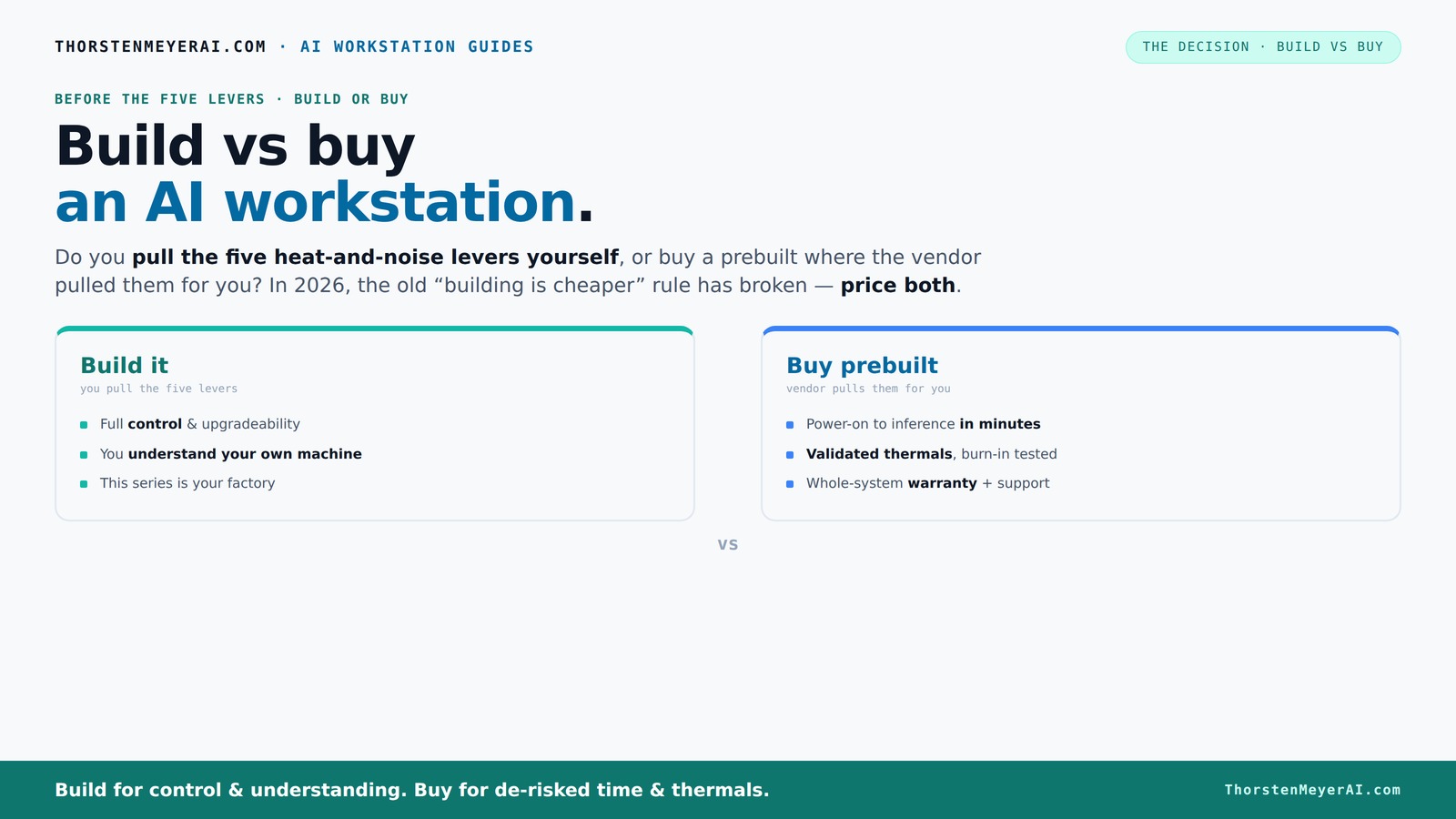
Build vs buy
an AI workstation.
The real question behind this whole series: do you pull the five heat-and-noise levers yourself, or buy a prebuilt where the vendor pulled them for you? And in 2026, the old “building is cheaper” rule has broken. Match your situation in Part 3.
Key Takeaways
- In 2026, component shortages and bulk buying have made prebuilts often as cheap or cheaper than DIY builds, reversing the old cost advantage.
- Prebuilt systems come fully validated for thermals and noise, saving you time and reducing risk during critical AI workloads.
- Building offers customization and upgrade flexibility, but demands time, expertise, and ongoing maintenance.
- For quick deployment and support, prebuilts are usually the better choice, especially for multi-GPU or high-end AI setups.
- Always price both options for your specific configuration — the market has shifted the usual build vs buy calculus.
high performance AI workstation prebuilt
As an affiliate, we earn on qualifying purchases.
As an affiliate, we earn on qualifying purchases.
Why 2026 Changes the Classic Build vs Buy Debate
Traditionally, building your own AI workstation saved money. But in 2026, market forces have shifted that balance. Major component shortages and skyrocketing prices for GPUs, DDR5 RAM, and SSDs mean DIY builds are often pricier than prebuilt systems.
Large vendors bought components in bulk before prices spiked, allowing them to offer systems at prices that are now hard to match. For example, a high-end GPU that used to cost around $800 now often sells for $1,200 or more. Meanwhile, prebuilts like those from Dell or Lambda can sometimes match or beat DIY prices due to their buying power — a surprising twist.
So, your old rule — DIY is cheaper — no longer applies without a detailed price check for your specific setup. This shift makes the decision more about time, support, and customization than just cost.
customizable AI GPU workstation build
As an affiliate, we earn on qualifying purchases.
As an affiliate, we earn on qualifying purchases.
Who Pulls the Levers? The Build vs Buy Showdown
Building a workstation means you control five key levers: cooling, airflow, undervolting, fan curves, and placement. Do you want to do that work, or pay someone else to do it for you? The answer shapes your decision.
Buy a prebuilt → the vendor pulls those levers, tuning the system for heat, noise, and stability. Companies like Lambda or Puget run hours of burn-in testing, validate thermals, and often include water cooling. You get a system that's ready to handle sustained AI loads without throttling.
Build it yourself → you pull those levers, choosing quiet GPUs, undervolting, and optimizing airflow — gaining full control and understanding of your machine. It’s a rewarding process but demands time, knowledge, and patience. This control allows for fine-tuning performance and noise levels, which can be critical for long-running AI tasks or noise-sensitive environments. However, it also introduces tradeoffs: the risk of misconfiguration, potential hardware instability, and the need for ongoing maintenance and adjustments as components age or workloads change.
professional AI workstation with RTX 4090
As an affiliate, we earn on qualifying purchases.
As an affiliate, we earn on qualifying purchases.
When a Prebuilt AI Workstation Really Pays Off
If your priority is quick deployment, a prebuilt system can be a game-changer. It arrives with the OS, AI software stacks like CUDA and TensorFlow, and is tuned for sustained performance. For example, a BIZON machine can be up and running in under an hour, ideal for teams who need to start training models immediately.
Support and warranty also matter. Prebuilts come with manufacturer-backed guarantees, often 3–5 years, covering hardware failures and troubleshooting. Learn more at kiss-me.org. This reduces downtime during critical projects and spares you the headache of diagnosing hardware issues yourself. Having reliable support can be a significant advantage, especially when working on time-sensitive projects where hardware failures could mean costly delays.
Multi-GPU setups, which are notoriously tricky to get right, are where prebuilt vendors shine. They validate power delivery and cooling under heavy loads, saving you from costly trial-and-error. This validation reduces the risk of system instability, thermal throttling, or hardware damage, which can be expensive and time-consuming to troubleshoot if you go the DIY route.
prebuilt AI workstation for deep learning
As an affiliate, we earn on qualifying purchases.
As an affiliate, we earn on qualifying purchases.
Why Building Your Own AI Workstation Still Makes Sense
If you have the time, skill, and a specific workload, building your own machine can be the smarter move. You pick every component — from the quiet GPU to the high-quality PSU and custom cooling — ensuring it’s tailored exactly to your needs. This level of customization allows you to optimize for specific AI tasks, whether that’s maximizing power efficiency, minimizing noise, or incorporating unique hardware like NPUs or specialized accelerators.
For example, a hobbyist working on a niche AI project might undervolt a GPU for quieter operation, or choose a case with superior airflow. You also gain the ability to upgrade individual parts later, like swapping in a new NPU or faster RAM. This flexibility can extend the useful life of your system and adapt to evolving project requirements.
Moreover, the process of building your own system can be educational and satisfying. It deepens your understanding of hardware performance and compatibility, which can be invaluable for troubleshooting or future upgrades. With comprehensive guides available online, most enthusiasts can avoid common pitfalls and create a system that perfectly matches their needs, even if they’re not professional engineers.
Cost Breakdown: Building vs Buying in 2026
| Factor | Build | Buy |
|---|---|---|
| Component Cost | Typically lower but rising due to shortages | Often competitive or slightly higher, thanks to bulk buying |
| Labor & Assembly | Free if DIY, or cost of your time | Included in price, no effort required |
| Support & Warranty | Multiple warranties, DIY troubleshooting | Single vendor support, usually longer warranty |
| Time to Ready | Hours to days, depending on experience | Minutes to hours, plug-and-play |
| Upgrade Flexibility | High, with DIY upgrades | Variable, often proprietary parts limit upgrades |
Choosing the Right Path for Your AI Project
Think about your workload, timeline, and technical skills. If you need a system today, prebuilt is your best bet. For example, if you’re starting a new AI research project next week, a prebuilt with validated thermals gets you going fast.
But if you have time, enjoy the process, and want perfect control, building your own may save money and give you a deeper understanding — especially if you’re experimenting with custom cooling or NPU integration.
And don’t forget: market shifts mean you should always do a quick price check. Sometimes, the DIY route isn't cheaper anymore.
Understanding these factors helps you weigh the tradeoffs more effectively. For instance, if your project requires rapid scaling or quick deployment, the time saved with a prebuilt can outweigh the cost savings of DIY. Conversely, if your project involves unique hardware configurations or long-term upgrades, investing in a custom build might offer better value and control.
Recent Trends and Future Outlook
The AI hardware market is evolving fast. Vendors now offer AI-optimized prebuilts with integrated NPUs, VRMs tuned for AI workloads, and pre-installed software stacks. According to Dell, AI PCs are becoming more about turnkey performance and less about custom builds.
Component shortages persist, but the value proposition of prebuilts improves as they incorporate the latest AI hardware features, reducing setup time and troubleshooting. Expect that in 2026, the best choice will depend heavily on your specific workload and timeline.
Looking ahead, the trend suggests a shift toward more integrated, user-friendly AI systems that require minimal setup and maintenance, especially for enterprises and research institutions. This trend indicates that the convenience and reliability of prebuilts will continue to grow, but at the expense of some customization and upgrade flexibility.
Frequently Asked Questions
Is a prebuilt AI workstation worth the extra cost?
If you need to start working immediately, a prebuilt can save days or weeks of setup and troubleshooting. Plus, with validated thermals and support, it often reduces downtime during critical projects.How much more expensive is prebuilt vs building it yourself?
It varies, but recent market shifts mean prebuilts are often on par or even cheaper than DIY, especially when accounting for component shortages and markup. Always compare your exact configuration prices.Which option is better for AI training versus inference?
For training, stability and thermal validation matter more, making prebuilts attractive. For inference, customized builds can be optimized for power efficiency and specific models, but require more effort.Can I upgrade a prebuilt AI workstation later?
Depends on the vendor and design. Many prebuilts use proprietary parts, which can complicate upgrades. Check if the system supports standard DIMMs, GPUs, and SSDs before buying.Do prebuilts with NPUs really help in AI workloads?
Yes. NPUs and AI-optimized hardware can significantly accelerate inference tasks, reduce power consumption, and improve efficiency, especially in supported software environments.Conclusion
Deciding whether to build or buy your AI workstation in 2026 isn't just about dollars. It’s about how fast you need it, how much control you want, and how much time you're willing to invest. Sometimes, paying a premium for a validated, ready-to-go system makes the most sense — especially as market conditions blur the cost lines.Fall Picks
fall essentials
As an affiliate, we earn on qualifying purchases.


![10 Things To Do For This Saturday in L.A. [7-4-2026]](https://theearlierstuff.com/wp-content/uploads/2026/07/10-things-to-do-for-this-saturday-in-l-a-7-4-2026-featured-560x300.jpg)