
Kanban is a great way for you to visualize and manage your personal workflow. By using a simple board divided into columns like “To Do,” “In Progress,” and “Done,” you can see the status of your tasks at a glance. This method helps you prioritize effectively and reduces overwhelm. As you move tasks to “Done,” you’ll feel a sense of accomplishment. Stick around to discover how to incorporate Kanban into your daily routine for even better results.
Key Takeaways
- Kanban visualizes personal tasks by organizing them into columns like “To Do,” “In Progress,” and “Done” for easy tracking.
- Tasks are represented on sticky notes or digital cards, enhancing visibility and providing a clear overview of your workflow.
- Color codes and tags can be used to prioritize tasks based on urgency and importance, making prioritization simpler.
- Limiting the number of tasks in progress reduces overwhelm and encourages focus, improving overall productivity.
- The Kanban system is flexible, allowing for easy rearrangement of tasks to adapt to changing priorities and unexpected delays.

Have you ever felt overwhelmed by your to-do list? You’re not alone. Many people struggle with the sheer volume of tasks they face daily, often leading to stress and burnout. That’s where Kanban comes in. This visual tool isn’t just for teams; it can transform how you manage your personal tasks, making it easier to achieve task prioritization and workflow optimization.
Imagine having a clear visual representation of your tasks. With Kanban, you can create a simple board divided into columns: “To Do,” “In Progress,” and “Done.” Each column represents a stage in your workflow, allowing you to see your tasks at a glance. When you write down each task on a sticky note or a digital card, you’re not just listing them; you’re setting yourself up for success. This visibility helps you prioritize what needs your attention first, enabling you to focus on the most important tasks without getting lost in the noise.
Visualize your tasks with Kanban’s clear board layout, prioritizing effectively to enhance focus and productivity.
As you move tasks across the board, you’ll notice how satisfying it is to shift items from “In Progress” to “Done.” This not only boosts your motivation but also provides a sense of accomplishment. To enhance task prioritization, consider using color codes or tags to identify urgent tasks or categories like work, personal, or urgent. This way, you’ll always know what needs your focus at any given moment.
Workflow optimization is another significant benefit of using Kanban. By limiting the number of tasks you have in the “In Progress” column, you can reduce overwhelm and concentrate on completing tasks efficiently. It’s easy to get distracted when juggling multiple projects, but Kanban encourages you to finish what you start before taking on new tasks. This method promotes a smoother workflow, allowing you to see how much time and energy you can allocate to each task realistically.
You can also adjust your Kanban board as needed. If a task takes longer than expected, you can easily rearrange your priorities. Flexibility is key. Don’t hesitate to tweak your workflow to suit your changing needs. Remember, this system is designed to work for you, not against you. Additionally, just as community forums and social media groups provide insights for spearfishers, sharing your Kanban board with others can lead to valuable feedback and new ideas.
Incorporating Kanban into your daily routine can radically change how you approach tasks. With better task prioritization and optimized workflow, you’ll find yourself less stressed and more productive. So why not give it a try? Your to-do list might just become a source of empowerment rather than overwhelm.

Scrum Board Tool Kit Magnetic Kanban Board, Office Task Management System with to Do, Doing, Verify, Done Columns, 4-Column Workflow Board for Project Planning
VISUAL WORKFLOW: 4-column magnetic board featuring To Do, Doing, Verify, and Done sections for clear task progression and…
As an affiliate, we earn on qualifying purchases.
As an affiliate, we earn on qualifying purchases.
Frequently Asked Questions
Can Kanban Be Used for Non-Work-Related Tasks?
Absolutely, you can use Kanban for non-work-related tasks! It’s great for personal goal setting and daily habit tracking. You can create boards for your fitness goals, hobbies, or even chores. By visualizing your tasks, you’ll stay motivated and organized. Just break down your goals into manageable steps, move them through your board as you complete them, and watch your progress unfold. You’ll find it’s a fun way to stay on track with your personal life!
How Do I Customize My Kanban Board Layout?
If you’re looking to sprinkle some magic on your Kanban board, start with layout personalization. You can easily customize your board by adjusting columns to fit your needs and using custom card sorting to prioritize tasks. Consider adding labels or color codes for a dash of flair. Remember, it’s all about creating a system that feels right for you, making your workflow not just efficient, but enjoyable too!
What Tools Can I Use to Create a Digital Kanban Board?
You can use several digital tools to create a kanban board, like Trello, Asana, or Monday.com. These platforms offer user-friendly interfaces that support visual management, making it easy to track your tasks and progress. You’ll find customizable templates and features that suit your workflow. Additionally, tools like ClickUp and Notion provide great flexibility for organizing your boards. Just pick the one that feels right for you and start visualizing your tasks!
How Often Should I Review My Kanban Board?
“Out of sight, out of mind.” You should review your Kanban board at least once a week to maintain focus and adapt your workflow. This review frequency helps you assess progress and prioritize tasks effectively. Consider reflecting at the beginning or end of the week, allowing you to evaluate what’s working and what isn’t. Regular check-ins keep you organized and motivated, ensuring you stay on track with your goals.
Can I Integrate Kanban With Other Productivity Methods?
Yes, you can easily integrate Kanban with other productivity methods! By combining it with task prioritization techniques, you’ll enhance your workflow efficiency. For instance, you can use the Eisenhower Matrix to decide which tasks to place on your Kanban board. Additionally, incorporating habit tracking can help you visualize your progress on daily routines, making it easier to stay motivated and organized. Experiment with different combinations to find what works best for you!
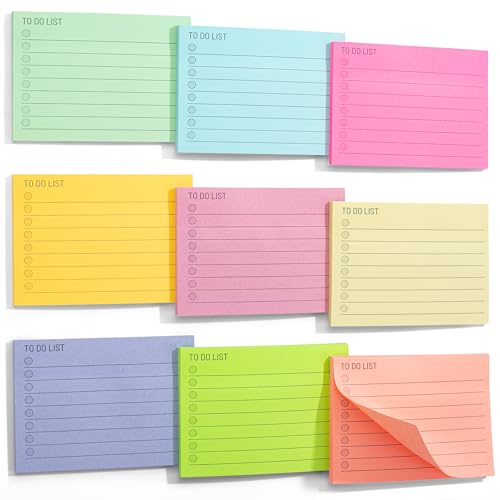
Mr. Pen- Assorted Color 4"x3" Lined Sticky Notes, 360 Sheets, 9 Pads, Perfect for Organization, Note-taking, Task Management, Home/Office Use
Get organized with our 9 pads of lined sticky notes, each pad containing 40 sheets for a total…
As an affiliate, we earn on qualifying purchases.
As an affiliate, we earn on qualifying purchases.
Conclusion
Embracing Kanban for your personal workflow can truly transform how you manage tasks and boost your productivity. By visualizing your responsibilities, you gain clarity and control over your day-to-day life. The theory that a clear, organized system reduces stress holds up; when you see your tasks laid out, it’s easier to prioritize and tackle them. So, give it a try! You might just find that this simple method makes a big difference in how you approach your goals.
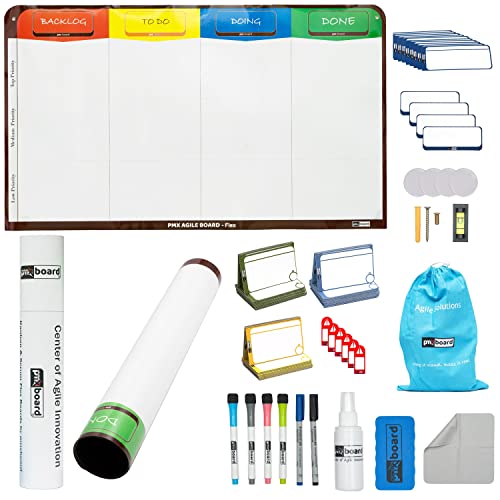
pmxboard 4 Column Magnetic Kanban Board, Scrum Board Flex Whiteboard Kit. Agile Kit, 64 Magnetic Kanban Cards Kit, Scrum Cards Set. Project Management Board for Project Planning, Kanban Whiteboard Kit
✔ FULL AGILE MANAGEMENT BOARD SET. A special flexible Magnetic Agile Board comes with 64 pieces of Magnetic…
As an affiliate, we earn on qualifying purchases.
As an affiliate, we earn on qualifying purchases.

Avery Color-Coding Removable Labels, 1/2" x 1-3/4", Assorted Neon Colors, Non-Printable, 180 Blank Labels Total (6724)
Manage and identify items efficiently with bright rectangle labels that allow for effective color-coding and organizing for home,…
As an affiliate, we earn on qualifying purchases.
As an affiliate, we earn on qualifying purchases.