
Digital minimalism at work involves streamlining your digital environment to boost focus and productivity. Start by evaluating your apps and turning off non-essential notifications to minimize distractions. Organize your files and emails to make access easier and declutter your digital workspace. Use automation features to manage your inbox effectively, ensuring you prioritize urgent messages. By adopting mindful tech habits and incorporating regular breaks, you’ll create a calmer work atmosphere. Discover more strategies to enhance your productivity effortlessly.
Key Takeaways
- Assess and remove non-essential apps to streamline your digital workspace and enhance focus.
- Organize files and emails into labeled folders for quick access and reduced distraction.
- Utilize automation features to filter and prioritize important emails, minimizing inbox clutter.
- Designate tech-free times to foster mental breaks and reduce constant digital stimulation.
- Incorporate relaxation techniques regularly to maintain mental clarity and combat workplace stress.
How often do you find yourself overwhelmed by the constant barrage of notifications, emails, and digital distractions at work? If you’re like most people, you probably experience email overload daily. Every ping from your inbox feels urgent, demanding your attention. You might think you can handle it, but soon enough, you realize it’s spiraling out of control. The more you try to keep up, the more distracted you become, leading to a cycle of inefficiency. To break free from this chaos, you need effective notification management strategies that work for you.
Feeling overwhelmed by constant notifications and emails? You’re not alone—email overload can spiral into inefficiency. Effective strategies can restore your focus.
Start by evaluating the apps and tools you use. Do you really need all those notifications? Take a moment to identify which apps are essential for your work. Consider turning off non-essential notifications. This simple step can help you regain focus and minimize interruptions. Schedule specific times to check your emails rather than letting them dictate your day. You’ll be surprised at how much more productive you can be when you limit the constant distractions that come with email overload.
Next, consider decluttering your digital workspace. Just like a messy desk can hinder your productivity, an overcrowded digital environment can do the same. Go through your apps and delete those you haven’t used in months. Organizing your files and emails into folders can also keep your digital space tidy. When everything’s in its place, it’s easier to find what you need, allowing you to concentrate on important tasks without losing time searching.
Don’t overlook the power of automation. Many email platforms offer features that can help manage your inbox more efficiently. Filters can automatically sort incoming messages, sending less urgent ones to a separate folder. This way, you can prioritize what really matters without feeling overwhelmed by email overload. You’ll notice that you spend less time sifting through irrelevant messages.
Lastly, practice mindful tech use. Set boundaries for yourself. Designate tech-free times during the day to give your brain a break from constant stimulation. Whether it’s during lunch or the last hour of your workday, stepping away from screens can boost your mental clarity. By applying these digital minimalism strategies, you’ll create a work environment that fosters focus and productivity, turning chaos into calm. Embrace the shift, and you’ll find that laser focus is within reach. Additionally, incorporating effective relaxation techniques can further enhance your ability to concentrate and manage stress effectively throughout your workday.

Bit Literacy: Productivity in the Age of Information and E-mail Overload
As an affiliate, we earn on qualifying purchases.
As an affiliate, we earn on qualifying purchases.
Frequently Asked Questions
How Can I Convince My Team to Adopt Digital Minimalism?
To convince your team to adopt digital minimalism, start by highlighting the benefits of improved team engagement and effective communication. Share examples of how reducing digital clutter can boost productivity and focus. Encourage discussions about the challenges of multitasking and constant notifications, and suggest simple strategies for minimizing distractions. Foster an open environment where everyone feels comfortable sharing their experiences, so they’ll be more likely to embrace these changes together.
What Are the Risks of Digital Minimalism in a Collaborative Environment?
In a collaborative environment, digital minimalism can feel like stepping onto a tightrope without a safety net! You risk privacy concerns, as fewer tools might mean less secure communication. Plus, dependency risks lurk around every corner; if your team leans too heavily on a minimal setup, they could struggle when unexpected challenges arise. Striking the right balance is essential to guarantee efficiency without sacrificing teamwork and security in the process.
Can Digital Minimalism Improve My Work-Life Balance?
Yes, digital minimalism can definitely improve your work-life balance. By focusing on essential tools and eliminating distractions, you enhance your productivity hacks and create mental clarity. This streamlined approach allows you to prioritize tasks effectively, reducing stress and freeing up time for personal activities. When you declutter your digital space, you’ll find it easier to switch off after work, leading to a healthier separation between your professional and personal life.
What Are the Signs I Need Digital Decluttering?
If you feel overwhelmed by email overload and constant notifications, it’s time for digital decluttering. You might think you can handle it, but that stress can drain your energy. Look for signs like difficulty focusing, increased anxiety, or procrastination. If checking your phone feels like a chore, it’s a clear sign. Take action to simplify your digital environment, and watch how quickly your productivity and peace of mind improve.
How Often Should I Reassess My Digital Tools?
You should reassess your digital tools regularly, ideally every few months. This tool evaluation helps you identify what’s still beneficial and what needs decluttering. If you notice distractions or inefficiencies, it might be time for a more frequent check-in. Don’t hesitate to modify your tools as your needs change; staying adaptable ensures you maintain focus and productivity. Regular reflection on your digital landscape keeps your workflow streamlined and effective.

Declutter Your Digital Life: Take Back Control in 52 Weeks
As an affiliate, we earn on qualifying purchases.
As an affiliate, we earn on qualifying purchases.
Conclusion
In a world overflowing with digital distractions, embracing minimalism at work is like clearing a cluttered desk to find your favorite pen. When you declutter your digital tools, you sharpen your focus and ignite creativity. Just as a clear workspace boosts productivity, streamlined apps let you tackle tasks with laser precision. So, take a moment to trim the digital fat; you’ll be amazed at how much more you can accomplish when you’re not weighed down by unnecessary noise.
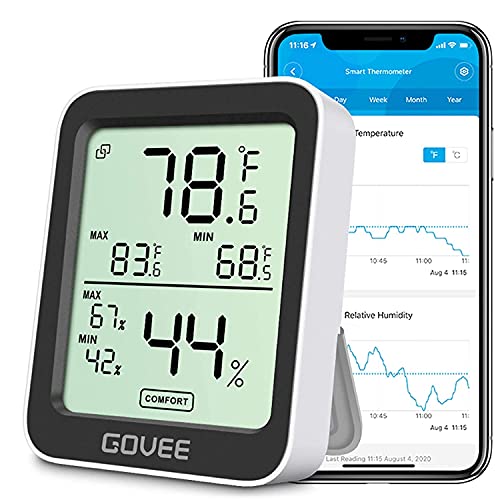
Govee Indoor Hygrometer Thermometer H5075 with Bluetooth App Control
- Smart Remote Monitoring: Supports Bluetooth remote monitoring and graphs
- High Accuracy Sensor: Temperature ±0.54°F, Humidity ±3%RH
- Fast Refresh Rate: Updates every 2 seconds
As an affiliate, we earn on qualifying purchases.
As an affiliate, we earn on qualifying purchases.
![DeskFX Free Audio Effects & Audio Enhancer Software [PC Download]](https://m.media-amazon.com/images/I/41fXbDohyuS._SL500_.jpg)
DeskFX Free Audio Effects & Audio Enhancer Software [PC Download]
- Audio Transformation: Enhance sound from speakers and headphones
- Sound Quality Enhancement: Adjust audio with various effects
- Audio Control: Manage sound through hardware settings
As an affiliate, we earn on qualifying purchases.
As an affiliate, we earn on qualifying purchases.